
Appearance
Polygon Syntax
This page describes how to define polygons using Well-Known Text (WKT) format for use with the GEOGRAPHY type in Yellowbrick.
Overview
Yellowbrick follows the official WKT specification for polygon syntax, as defined by the OGC (Open Geospatial Consortium). A WKT POLYGON consists of an outer boundary (also called the outer ring), optionally followed by one or more inner boundaries (holes).
Coordinate Format
- Coordinates are specified in longitude/latitude order, in decimal degrees.
- Example:
POINT(-122.27652 37.80574)represents a location near Oakland, California.
Polygon Orientation and Surface Area
Yellowbrick does not use winding direction (clockwise vs. counterclockwise) to determine which side of a polygon is considered the interior. Instead, we follow the PostGIS behavior:
The inside of a polygon is always defined as the smaller portion of the sphere's surface.
This implies:
- A polygon may not cover more than a hemisphere.
- Drawing the same polygon clockwise or counterclockwise will yield the same interior, provided that it's less than a hemisphere.
- If you need to represent an area larger than a hemisphere, use a
MULTIPOLYGONcomposed of smaller polygons.
WKT Syntax for POLYGON
A POLYGON is defined as a sequence of linear rings:
sql
POLYGON((
  <outer_ring_coordinates>
), (
  <hole_1_coordinates>
), (
  <hole_2_coordinates>
), ...
)- Each ring is a list of
longitude latitudepoints. - Rings must be closed—the first and last point must be the same.
- The first ring defines the outer boundary.
- Additional rings define holes (excluded areas).
Example: Simple Polygon
sql
select
    'POLYGON((0 0, 0 1, 1 1, 1 0, 0 0))'::geography counterclockwise,
    'POLYGON((2 0, 3 0, 3 1, 2 1, 2 0))'::geography clockwise;
This defines two square from (0,0) to (1,1) and from (2,0) to (3,1). One is clockwise the other counterclockwise.

Example: Polygon with a Hole
sql
POLYGON((
  0 0, 0 10, 10 10, 10 0, 0 0          -- Outer ring
), (
  3 3, 3 7, 7 7, 7 3, 3 3              -- Hole (inner ring)
))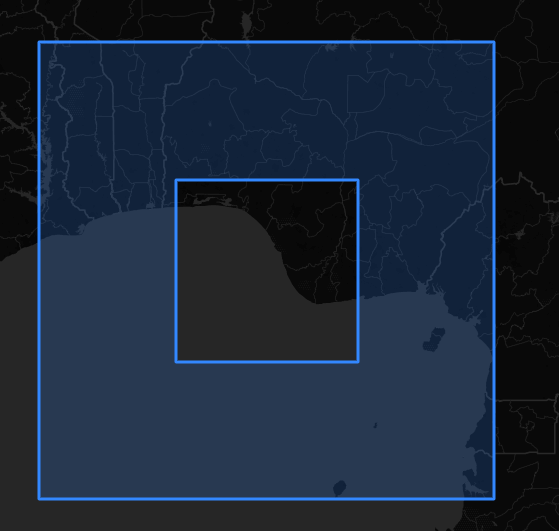
This creates a 10×10 square with a 4×4 hole in the center.
WKT Syntax for MULTIPOLYGON
A MULTIPOLYGON allows you to represent multiple disjoint polygon shapes in a single object.
Example: Multi-region area
sql
MULTIPOLYGON(
  ((0 0, 0 1, 1 1, 1 0, 0 0)),         -- First polygon
  ((2 2, 2 3, 3 3, 3 2, 2 2))          -- Second polygon
)
Each polygon is wrapped in its own set of double parentheses. This is useful for:
- Representing disconnected shapes.
- Working around hemisphere limits (split a large area into smaller parts).