
Appearance
GCP Public Installation Instructions
Prerequisites
On GCP, you need a project and the permissions to create and assign IAM roles. While not required, it is recommended to use a dedicated project for resource isolation. To run the Deployer you will need to be logged with the gcloud CLI. The following APIs must be enabled:
- Google Cloud APIs
- Cloud Resource Manager API
- Artifact Registry API
- Cloud Autoscaling API
- Compute Engine API
- Kubernetes Engine API
- Identity and Access Management (IAM) API
- Cloud Storage API
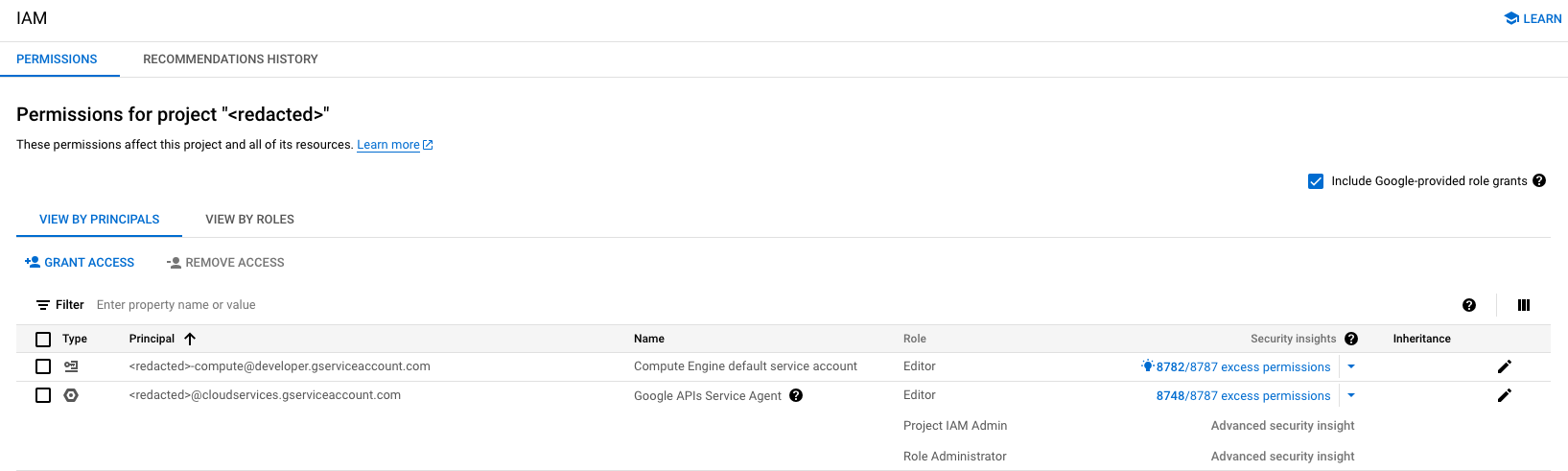
You'll need to make sure you can access the network the deployer is running in from a web browser. You will need to give the Project IAM Admin and Role Administrator permissions to the Google APIs Service Agent service account on the IAM portal. That service account is the one with the following email format:
txt
<project-number>@cloudservices.gserviceaccount.comIt may not appear by default in the IAM page; the Include Google-provided role grants checkbox must be checked to show it:
Quota
The following minimum quota limits are required to successfully run the Deployer.
| Quota name | Value |
|---|---|
| C3 CPUs | 82 |
| Local SSD per VM family (GB), Family C3 | 7500Gb |
Launching the Deployer
NOTE
By installing Yellowbrick Enterprise Edition software into your Cloud Account, you agree to Yellowbrick's Enterprise Edition EULA.
The GCP Deployer is deployed using Google Cloud Infrastructure Manager, a managed service that automates infrastructure deployment.
Requirements
- gcloud CLI configured for your project
- Infrastructure Manager API enabled in your project
- A service account with the following roles:
roles/config.admin- manage Infrastructure Manager deploymentsroles/compute.admin- create compute resourcesroles/iam.serviceAccountAdmin- create service accountsroles/iam.roleAdmin- create custom IAM rolesroles/resourcemanager.projectIamAdmin- bind IAM rolesroles/iam.serviceAccountUser- act as service accounts
Enable the Infrastructure Manager API:
bash
% gcloud services enable config.googleapis.comCreate a service account for Infrastructure Manager:
bash
% gcloud iam service-accounts create yb-infra-manager-sa \
    --display-name="Yellowbrick Infrastructure Manager"

% for role in config.admin compute.admin iam.serviceAccountAdmin \
    iam.roleAdmin resourcemanager.projectIamAdmin iam.serviceAccountUser; do
    gcloud projects add-iam-policy-binding YOUR_PROJECT_ID \
      --member="serviceAccount:yb-infra-manager-sa@YOUR_PROJECT_ID.iam.gserviceaccount.com" \
      --role="roles/$role"
  done
Deploy the installation program
Deploy the Yellowbrick installation program using Infrastructure Manager:
bash
% gcloud infra-manager deployments apply yb-enterprise-deployer \
    --location=us-central1 \
    --service-account="projects/YOUR_PROJECT_ID/serviceAccounts/yb-infra-manager-sa@YOUR_PROJECT_ID.iam.gserviceaccount.com" \
    --gcs-source=gs://yb-installer-prod/7.4.3-81959.e8131943/installer.zip \
    --input-values='project_id=YOUR_PROJECT_ID,deployment_name=yb-enterprise-deployer'
The deployment will take a few minutes. Check the status with:
bash
% gcloud infra-manager deployments describe yb-enterprise-deployer \
    --location=us-central1
Once complete, retrieve the Deployer URL and access credentials:
bash
% curl -s "$(gcloud infra-manager deployments export-statefile yb-enterprise-deployer \
    --location=us-central1 --format='value(signedUri)')" | jq '.outputs'
This will display the deployment outputs including:
installer_url- The URL to access the Deployer UIinstaller_ip- The external IP addressaccess_key- The access key for authentication
Customize the Deployment (Optional)
You can customize the deployment by setting additional input values:
| Variable | Description | Default |
|---|---|---|
project_id | Your GCP project ID | (required) |
deployment_name | Prefix for all resources | (required) |
region | GCP region | us-east1 |
zone | GCP zone | us-east1-b |
Example with custom region:
bash
% gcloud infra-manager deployments apply yb-enterprise-deployer \
    --location=us-central1 \
    --service-account="projects/YOUR_PROJECT_ID/serviceAccounts/yb-infra-manager-sa@YOUR_PROJECT_ID.iam.gserviceaccount.com" \
    --gcs-source=gs://yb-installer-prod/7.4.3-81959.e8131943/installer.zip \
    --input-values='project_id=YOUR_PROJECT_ID,deployment_name=yb-enterprise-deployer,region=us-west1,zone=us-west1-a'
Cleanup
To remove the Deployer and all associated resources:
bash
% gcloud infra-manager deployments delete yb-enterprise-deployer \
    --location=us-central1 \
    --project=YOUR_PROJECT_ID