 Product Documentation
Appearance
Uninstalling ybtools
If you need to remove client tools from your system, follow these steps.
Uninstall on Linux
To uninstall the client tools on Linux, run the following command:
- Ubuntu:
$ sudo apt-get remove -y ybtools- CentOS:
$ sudo yum remove ybtoolsNote: You can use the rpm -qa command to list all installed RPMs.
For example, on an Ubuntu client:
$ sudo apt-get remove -y ybtools
Reading package lists... Done
Building dependency tree
Reading state information... Done
The following packages were automatically installed and are no longer required:
  bsh libasm3-java libganymed-ssh2-java libisl13 libjackrabbit-java libjline-java libjna-java libjna-jni libjna-platform-java libjsch-agent-proxy-java libjsoncpp0v5 liblldb-3.8 libllvm3.8
  libmaven-scm-java libnetbeans-cvsclient-java libruby2.2 libsisu-guice-java llvm-3.8 llvm-3.8-dev llvm-3.8-runtime nagios-plugins-common python3-bcdoc ruby2.1-dev
Use 'sudo apt autoremove' to remove them.
The following packages will be REMOVED:
  ybtools
0 upgraded, 0 newly installed, 1 to remove and 325 not upgraded.
After this operation, 0 B of additional disk space will be used.
(Reading database ... 153987 files and directories currently installed.)
Removing ybtools (5.2.4-20201208023004) ...
Uninstall on Windows
On the Start menu, go to Control Panel > Uninstall a Program, then select the tools you want to remove.
Uninstall on macOS
Follow these steps:
- Open Yellowbrick Client Tools:
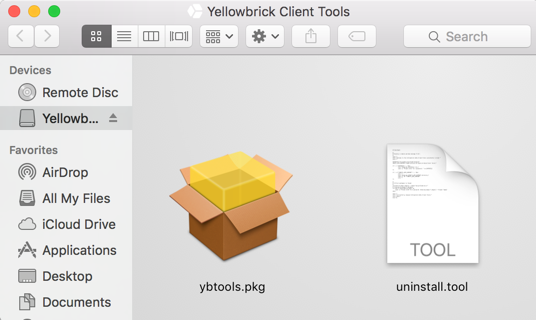
- Run the
uninstall.toolscript.
Welcome to the Yellowbrick Data Client Tools uninstaller script.

Removing /etc/paths.d/yellowbricktools file.
Please enter <user>'s password: <password>

Removing /Applications/Yellowbrick Data/Client Tools/ directory.

Forgot package 'com.yellowbrick.ybtools.' on '/'.

Successfully removed Yellowbrick Data Client Tools.
Done.

[Process completed]
Parent topic:Client Tools and Drivers