
Appearance
Setting up Yellowbrick as a Source in Databricks Unity Catalog
Overview
Databricks Unity Catalog lets users connect to external data sources like Yellowbrick. This enables users to query Yellowbrick directly from Databricks notebooks or SQL Warehouses. A common use case is for data scientists to bring cleansed and vetted "Gold" data from Yellowbrick into Databricks to build predictive models or run AI/ML pipelines.
Limitations
- DDL and DML statements are not permitted (e.g.,
INSERT,UPDATE,DELETE,CREATE,DROP). - Joins are not pushed down to Yellowbrick. Joins are executed within Databricks, requiring Yellowbrick data to be moved first. Best practice is to create a view in Yellowbrick that performs the join and then reference the view from Databricks.
Prerequisites
- If Yellowbrick is installed in a private VPC, the VPCs for Yellowbrick and Databricks must be peered. See VPC Peering for more information.
Detailed Steps
From the Catalog sidebar in the Databricks console, click
+, then select Create a Connection.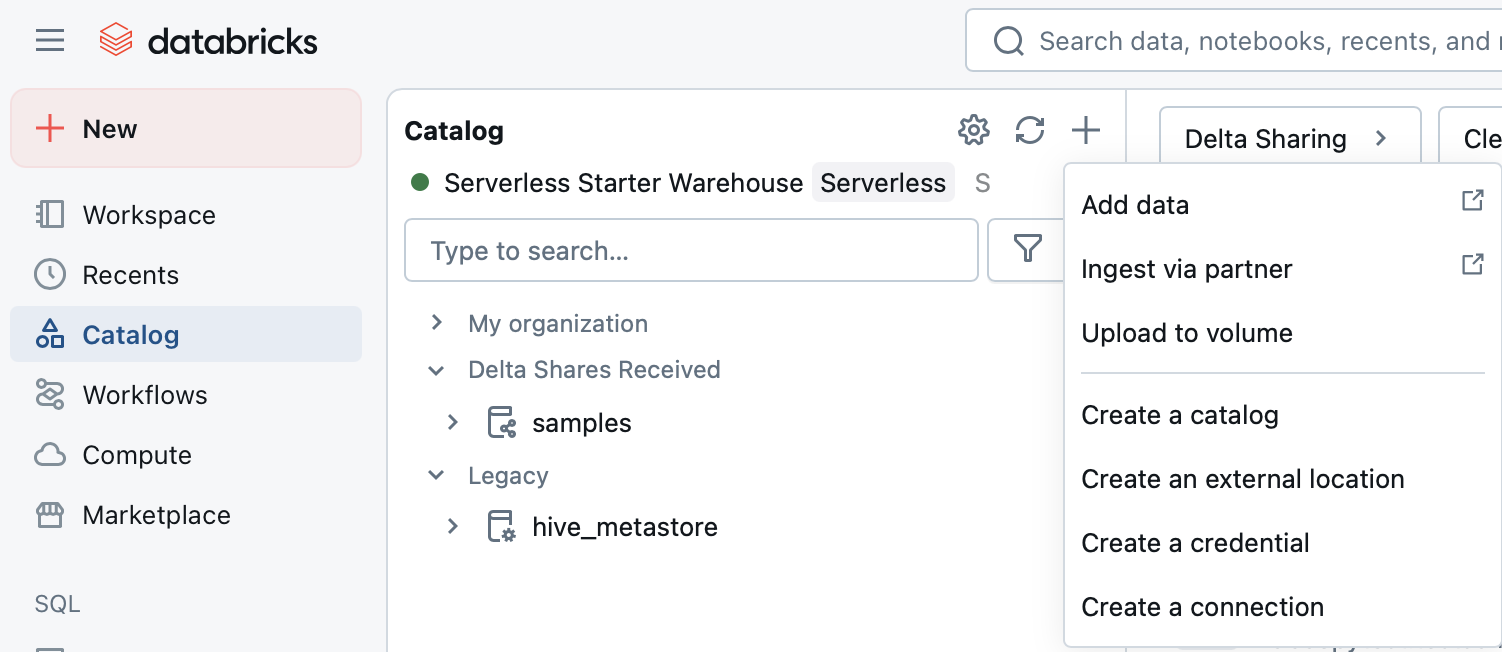
On the Connection Basics tab:
- Name:
[Name for your connection] - Connection Type:
PostgreSQL - Click Next.
- Name:
On the Authentication tab:
- Host:
[Your FQDN for Yellowbrick Instance, e.g., yb_prod.elb.us-east-1.amazonaws.com] - Port:
5432(or your custom port if changed) - User:
[Username] - Password:
[Password] - Click Next.
- Host:
On the Catalog Basics tab:
- Catalog Name:
[Name for the new DB Catalog representing the connection] - Database:
[Yellowbrick Database Name] - Click Test:
- Select an existing compute or start a serverless instance.
- Ensure the connection is successful.
- Click Create Catalog.
- Catalog Name:
On the Access tab:
- Keep the defaults or modify as needed.
- Click Next.
On the Metadata tab:
- Add metadata for Databricks documentation if needed.
- Click Save.
Using the New Catalog
The catalog can now be used as a read-only data source. It can be used in notebooks or SQL queries like any other Unity Catalog table. As queries hit this new catalog, Databricks will route the corresponding queries to the Yellowbrick compute cluster.